Contact PayPro Global
If you are having trouble placing your order, please first try again using a different browser, as this often solves any issues with regard to online payment.
Alternatively please contact them directly with any queries regarding your order, invoice, taxation etc.: support@payproglobal.com.
If you still have no success, please contact us directly, and we'll try to solve the issue for you.

IBExpert Developer Studio
(German-language version below)
The only tools you'll ever need
You develop SQL databases professionally and need an efficient and powerful tool? With IBExpert you have made the right choice. It enables you in just a short space of time to become acquainted with, and achieve a command of the open source database, Firebird, as well as its commercial relative, InterBase®. There are powerful and yet easy-to-learn editors for all essential functions.
Whether you enjoy the control of hand-coding DML or DDL statements or working in a visual editing environment, IBExpert makes it easy to get started and provides you with vital tools to speed and enhance your work.
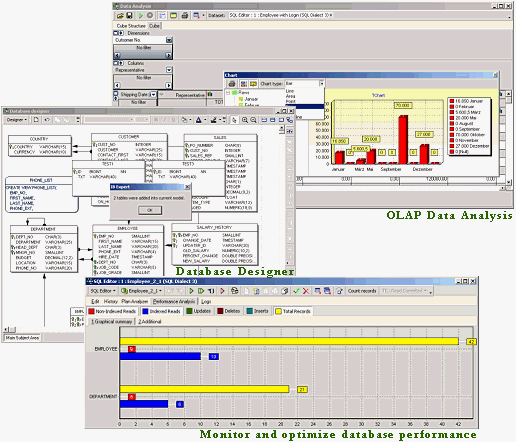
IBExpert includes many coding tools and features: visual editors for all database objects, an SQL Editor and Script Executive, a Debugger for stored procedures and triggers, a Query Builder, a powerful Database Designer and even its own scripting language, IBEBlock. A list of further IBExpert features can be found below.
IBExpert is the most comprehensive GUI tool for Firebird and InterBase® on the market today.
IBExpert Developer Studio includes the following components:
Documentation & support
All our products are accompanied by a comprehensive online documentation as well as online tutorials in our Learning Center.
Purchase
You can find a summary of all IBExpert software products and prices under IBExpert products, services & prices.
If you have any further questions please mail register@ibexpert.net.

IBExpert Features
- Monitor and optimize database performance with the Plan Analyzer, Performance Analysis, SQL Monitor, Database Statistics, Recompute Selectivity of all Indices, Recompile Procedures and Triggers, global Stored Procedure/Trigger Operations Index analysis etc.
- For advanced queries use the IBExpert Script Executive, which also offers a wide range of useful script extensions, only available in IBExpert; or the Visual Query Builder, ideal for those gaining their first experience with SQL.
- Create your own database from a model, or a model from your existing database with the Database Designer, including layers, subject areas, autoroute, notation format, and much more.
- Comprehensive Data Analysis / OLAP for cross-classified tables, statistics and graphics – all exportable in a number of formats.
- Copy, move or compare data and even join tables – all from different databases in a single script using IBEBlock.
- With IBEBlock you have a powerful set of DDL, DML and other statements executed on both the server and client side, and which include some specific constructs applicable only in IBExpert or IBEScript, regardless of the database server version.
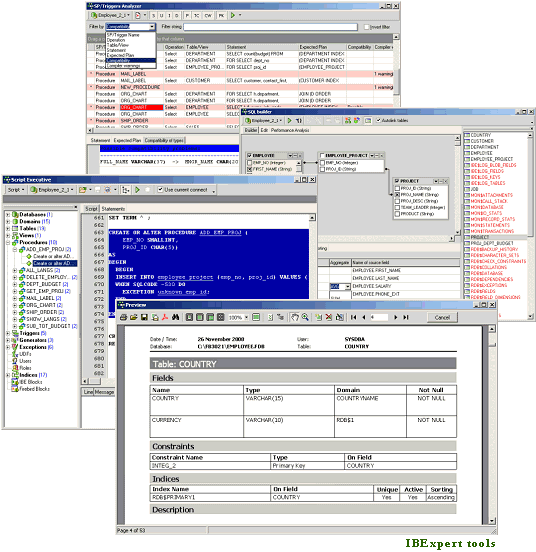
- Speed up and optimize your procedure and trigger programming with the Stored Procedure and Trigger Debugger; use the Assistant for their creation from any SQL statements; analyze using the Stored Procedure, Trigger and View Analyzer.
- User-defined or ready-made reports for database documentation, which can be stored in the database or as a file (PDF, Word etc.). Quick and simple HTML database documentation can be produced with just a few simple mouse clicks!
- Extract Metadata to create a copy of your database, with or without data content.
- Integrated Communications Diagnostic.
- Export of results in several formats; direct CSV file and ODBC data import.
- User and Grant Manager, with Autogrant function for automatic assignment of privileges for new database objects.
- See what's really happening in your database using IBExpert's Log Manager or the Trace and Audit Services (since Firebird 2.5).
- Hyperlinks, Code Completion, Assistants and many other features to speed up your development.
- Flexible user-definable interface – customize your screen, projects, code templates etc.
- Numerous product constellations to meet your requirements: Single and mutli-user software packages, Day Edition and free Personal and Educational versions.
- Regular fully-documented updates. Quick support of new Firebird features.
- Comprehensive documentation (context-sensitive, online and in printed form), online tutorial videos and active forum support.
- Multilingual.
- With full Unicode support.
- … and much, much more!
IBEScript.exe
All registered IBExpert Developer Studio versions (except the IBExpert Day Edition and the free IBExpert Developer Studio Educational Edition) include IBEScript.exe for your own script and IBEBlock development. This is also offered as part of the IBExpert Server Tools, for scripts and IBEBlock deployment on customer computers.
IBExpertDemoDB
Another component included in the Developer Studio is the IBExpertDemoDB database, which can be used for benchmark and performance testing.
Documentation & support
All our products are accompanied by a comprehensive online documentation as well as online tutorials in our Learning Center.
Purchase
You can find a summary of all IBExpert software products and prices under IBExpert products, services & prices.
If you have any further questions please mail register@ibexpert.net.
Das einzige Werkzeug, das Sie brauchen werden
Sie entwickeln SQL-Datenbanken professionell und benötigen ein effizientes und leistungsstarkes Werkzeug? Mit IBExpert haben Sie die richtige Wahl getroffen. Sie werden sich in kürzester Zeit mit seinen Funktionen vertraut machen können und so Ihre Open-Source-Datenbank Firebird und das kommerzielle Gegenstück InterBase® beherrschen. Ob Sie die Kontrolle handcodierter DML oder DDL Anweisungen oder das Arbeiten in einer optischen Entwicklungsumgebung bevorzugen, IBExpert macht Ihnen den Anfang leicht und bietet Ihnen hervorragende Werkzeuge zur Beschleunigung und Erweiterung Ihrer Arbeit.
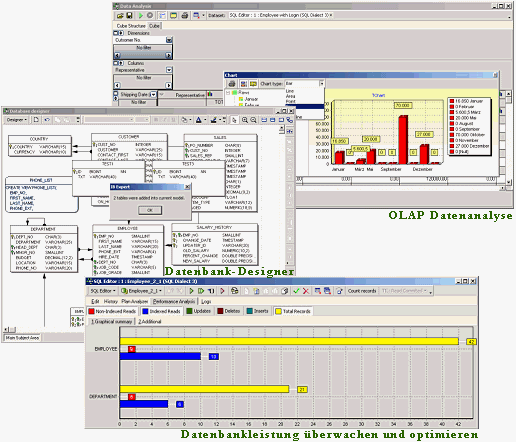
IBExpert enthält viele Codierwerkzeuge und Features: optische Editoren für alle Datenbankobjekte, ein SQL Editor und Skriptausführung, ein Debugger für Stored Procedures und Trigger, ein Abfragegenerator, einen leistungsstarken Datenbank-Designer und sogar die eigene Skriptsprache IBEBlock. Einen Überblick über alle IBExpert Features finden Sie hier.
IBExpert ist das umfassendste GUI Tool für Firebird und InterBase® auf dem heutigen Markt.
IBExpert Developer Studio beinhaltet folgende Komponenten:
Dokumentation & Support
IBExpert stellt eine umfassende Online Dokumentation sowie Online-Tutorials in unserem Learning Center zur Verfügung.
Bestellen
Eine Übersicht aller IBExpert Produkte und Diensteistungen finden Sie unter Alle Produkte & Preise.
Wenn Sie weitere Fragen haben, senden Sie bitte eine Mail an register@ibexpert.net.
IBExpert Features
- Überwachen und optimieren Sie die Datenbankgeschwindikeit mit der Plananalyse, Leistungsanalyse, SQL Monitor, Datenbankstatistik, Neuberechnung der Selektivität aller Indizes, Rekompilierung von Prozeduren und Triggern, globale Stored Procedure/Triggeroperationen, Indexanalyse etc.
- Verwenden Sie für komplexere Abfragen die IBExpert Skriptausführung, die über eine große Bandbreite an nützlichen Skripten verfügt, die nur in IBExpert erhältlich sind; oder der visuelle Abfragegenerator, ideal für diejenigen, die Ihre ersten Erfahrungen mit SQL machen.
- Erzeugen Sie Ihre eigene Datenbank von einem Modell, oder mit dem Datenbankdesigner ein Modell von Ihrer vorhandenen Datenbank, inklusive Layers, Themenbereiche, Autoroute, Benachrichtigungformat und vieles mehr.
- Umfassende Datenanalyse / OLAP für Kreuztabellen, Statistiken und Graphiken – alles exportierbar in viele Formate.
- Kopieren, verschieben oder vergleichen Sie Daten und verbinden Sie Tabellen – alles von verschiedenen Datenbanken in einem einzigen Skript mit IBEBlock.
- Mit IBEBlock haben Sie ein leistungsstarker Satz von DDL-, DML- und anderen Anweisungen, die auf der Server- und auf der Clientseite ausgeführt werden und die einige spezifische Konstruktionen enthalten, die nur in IBExpert oder IBEScript anwendbar sind, unabhängig von der Datenbankserverversion.
- Beschleunigen und optimieren Sie Ihre Prozeduren und Trigger durch Programmierung mit Stored Procedure und Trigger Debugger; verwenden Sie den Assistenten für deren Erzeugung aus einer SQL-Anweisung; analysieren Sie mit der Stored Procedure-, Trigger- und Viewanalyse.
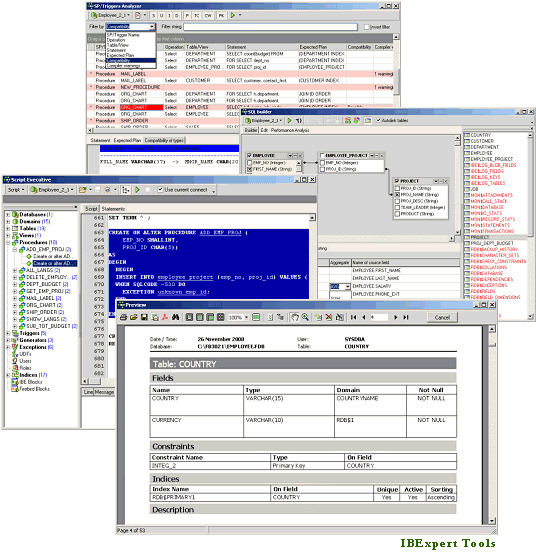
- Benutzerdefinierte oder vorgefertigte Berichte zur Datenbankdokumentation, die in der Datenbank oder als Datei (PDF, Word etc.). gespeichert werden können. Schnelle und einfache HTML-Datenbankdokumentation kann mit wenigen Mausklicks hergestellt werden!
- Extrahieren Sie Metadaten, um eine Kopie Ihrer Datenbank mit oder ohne Inhalt zu erstellen.
- Integrierte Kommunikationsdiagnose.
- Exportieren der Ergebnisse in verschiedene Formate; direkter CSV-Datei und ODBC-Datenimport.
- Benutzer- und Rechtemanager, mit Autogrant-Funktion zur automatischen Zuweisung von Rechten für neue Datenbankobjekte.
- Überwachen Sie Ihrer Datenbank mit Hilfe von den IBExpert Trace und Audit Services (seit Firebird 2.5).
- Hyperlinks, Codeergänzung, Assistenten und viele andere Features zur Beschleunigung Ihrer Entwicklung.
- Flexible benutzerdefiniertes Interface – passen Sie Ihren Bildschirm, Ihre Projekte, Code-Templates an etc.
- Zahlreiche Produktvarianten auf Ihre Bedürfnisse zugeschnitten: Einzel- und Multi-User Software Pakete, Day Editions, die IBExpert Developer Studio Company Year Edition und IBExpert Enterprise Server Year Edition für das Arbeiten in virtuellen Umgebungen, eine kostenlose Personal Edition und Schul-/Bildungsversion.
- Regelmäßige voll-dokumentierte Updates. Schnelle Unterstützung von neuen Firebird Features.
- Umfassende Online-Dokumentation, Online Lernvideos und aktiven Forum Support.
- mehrsprachig
- mit vollständigem Unicode-Support
- … und vieles, vieles mehr!
IBEScript.exe
Alle registrierten IBExpert Developer Studio Versionen (ausgenommen die IBExpert Day Edition und die kostenlose IBExpert Developer Studio Educational Edition) beinhalten die IBEScript.exe für die eigene Entwicklung von Skripten und IBEBlocks. Dies wird auch als Teil der IBExpert Server Tools angeboten, für den Einsatz Ihrer Skripte und IBEBlocks auf Kundenrechnern.
IBExpertDemoDB
Eine weitere Komponente, die im Developer Studio enthalten ist, ist die IBExpertDemoDB Datenbank, die als Benchmark und Leistungstest verwendet werden kann.
Dokumentation & Support
IBExpert stellt eine umfassende Online Dokumentation sowie Online-Tutorials in unserem Learning Center zur Verfügung.
Bestellen
Eine Übersicht aller IBExpert Produkte und Diensteistungen finden Sie unter Alle Produkte & Preise.
Wenn Sie weitere Fragen haben, senden Sie bitte eine Mail an register@ibexpert.net.
IBExpert Enterprise Server Year Edition
(German-language version below)
Software rental: IBExpert Enterprise Server Year Edition ESYE
Work with IBExpert software in a virtual environment
The ESYE contains the following components: IBExpert IDE, IBEScript.dll, IBEScript.exe and the BackupRestore Scheduler.
License Conditions and product description ESYE:
- 1 * IBExpert activation for 1 Server, location-independent, valid for 12 months starting from the date of purchase
- No hardware-related activation
- Only one active instance of a virtual machine is permitted when the installed IBExpert software is started.
- The components IBEScript.exe and IBEScript.dll can be started during runtime on the activated virtual server instance as often as required, but not on multiple virtual instances which have been copied or run in parallel by other methods.
- The IBExpert IDE ibexpert.exe may be started on the activated virtual server instance in the terminal server environment in a maximum of 4 processes concurrently.
- IMPORTANT!: There is no unlock procedure: If the machine with the activated IBExpert version needs to be replaced by another machine, a new ESYE license must be purchased for this machine.
- Includes all updates for 12 months
Please note the following:
In the event of justified suspicion of misuse, IBExpert shall be entitled to inspect the start log of all servers on which IBExpert software is used.
By purchasing this software product, the customer/licensee explicitly grants IBExpert permission to view the IBExpert log files by remote service.
Price per activation per year 669 €.
Activation for multiple years is possible and is taken into consideration when activating.
Please contact register@ibexpert.net for further information.
Softwaremiete: IBExpert Enterprise Server Year Edition ESYE
Um mit IBExpert Software in einer virtuellen Umgebung arbeiten zu können.
Die ESYE enthält die folgenden Komponenten: IBExpert IDE, IBEScript.dll, IBEScript.exe und den BackupRestore Scheduler.
Lizenzbedingungen und Beschreibung ESYE:
- 1 * IBExpert Aktivierung für 1 Server, standortunabhängig, Laufzeit 12 Monate ab Kaufdatum
- Keine hardwarebezogene Aktivierung
- Es ist nur eine laufende Instanz einer virtuellen Maschine beim Start der damit installierten IBExpert Software erlaubt
- Die Komponenten ibescript.exe und ibescript.dll können während der Laufzeit auf der aktivierten virtuellen Serverinstanz beliebig oft gestartet werden, jedoch nicht auf mehreren virtuellen Instanzen, die kopiert wurden oder durch andere Verfahren parallel laufen.
- Die IBExpert IDE ibexpert.exe darf auf der aktivierten virtuellen Serverinstanz in Terminalserverumgebung maximal in 4 Prozessen parallel gestartet werden.
- WICHTIG!: Es gibt kein Unlockverfahren: Wenn die Maschine mit der aktivierten IBExpert Version durch eine andere Maschine ersetzt werden muss, ist ein Neukauf der ESYE für diese Maschine erforderlich.
- Updates für 12 Monate enthalten.
Bitte beachten Sie folgendes:
Bei begründetem Missbrauchsverdacht ist IBExpert berechtigt, das Startprotokoll sämtlicher Server, auf denen IBExpert Software im Einsatz ist, einzusehen.
Durch den Kauf dieses Software-Produktes erteilt der Kunde/Nutzer IBExpert explizit die Erlaubnis, die verwendeten IBExpert Protokolldateien per Fernwartung einzusehen.
Preis pro Freischaltung pro Jahr 669 €
Eine Freischaltung für mehrere Jahre ist möglich und wird bei der Aktivierung berücksichtigt.
Kontaktieren Sie register@ibexpert.net für weitere Information.
IBExpert Personal Edition won't start
Make sure you always use the most up-to-date IBExpert Personal Edition. The latest IBExpert software version is available from the IBExpert Download Center.
Check whether you have requested too many free activations (see Error: too many Personal Edition registrations).
If the IBExpert Personal Edition still does not start, check your inbox for messages from our IBExpert server with advice on possible causes or problems.
IBExpert currently uses IBExpert.stg ...
If you have not specified and registered your IBExpert user database, you will receive the following error message, the first time you start IBExpert:
Please refer to IBExpert User Database.